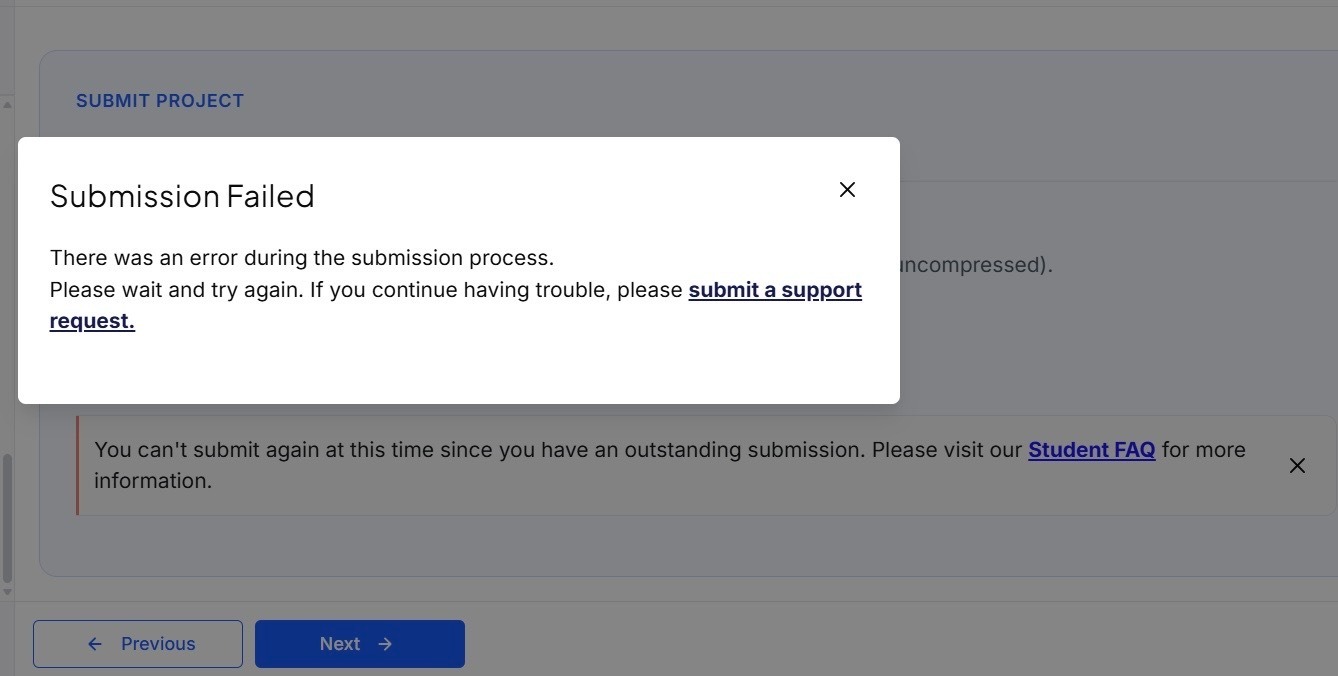
If you see an error message while resubmitting your project, it means further submissions are blocked for this project. This happens after multiple resubmissions that didn’t address the project’s requirements or incorporate the reviewer’s feedback.
Q: Why is this important?
Each resubmission is expected to reflect the project’s requirements and reviewer’s feedback. Continuing to resubmit work that does not meet the requirements slows down the review process and your progress.
Q: How do I know my project is flagged?
After resubmitting without addressing the required changes, your project will be flagged and further submissions will be blocked. You will receive an error message, and further submission attempts will no longer be allowed.
Q: How can I avoid this?
Before you click “Resubmit,” make sure you have:
- Read the reviewer’s comments carefully.
- Applied all requested changes and confirmed that all project requirements and feedback are fully addressed.
Q: What should I do if I cannot resubmit my project?
- Make the required changes to your project.
- Contact learner support and confirm that you have made the necessary updates.
Q: What are the best practices for submitting my projects?
- Use a checklist to ensure all project requirements are completed before submission.
- If you are unsure, reach out to experts in Knowledge before submitting.
- Ensure your submission meets all requirements and reflects any feedback you have received.