Writing code in a workspace used to leave one question open: is it right? Workspaces with auto-grading now answer it. You can check your work as you go and get a hint when you're stuck.
What is auto-grading?
In supported workspaces, the Submit button checks your code against a clear set of rubric criteria. Your results appear in the Result panel. You see which criterion you've met, and if something's off, you get AI Feedback on where to look next.
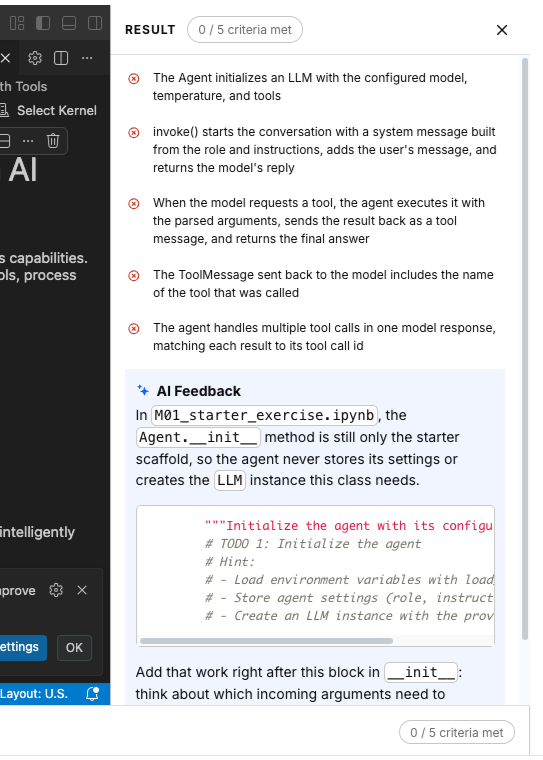
How to use it
- Open the exercise and find the View Result panel. It lists the criteria your code needs to meet.

- Write your code. Work in the workspace as you normally would.
- Save your files. Submit checks your saved work.
- Click Submit. Your code is checked in the same workspace, so there's nothing to set up.

- Read your results. Each criterion gets a ✓ or ✗, and the counter updates (for example, 3 / 5 criteria met).
- Read AI Feedback. If something fails, you get one explanation generated by AI.
- Fix and resubmit. You can retry anytime.
- Use Hide Result to collapse the panel and get more room for your code. Reopen it whenever you need it.
- When every criterion is met, you'll see a completion message.
FAQ
- Does every exercise have auto-grading?
- No. Only selected workspaces have auto-grading. Auto-grading exercises have the “Submit” button.
- Can I see the tests for grading?
- No. You see the rubric criteria, which describe what each test checks but you can’t see the tests.
- Does AI feedback affect my result?
- No. Your results don't depend on the AI. The results come from automated checks, which give the same result for the same code every time.
- Can I submit more than once?
- Yes. You can retry anytime.
- My results look wrong. Did I forget something?
- Make sure you save your files before submitting. Re-read the criterion and the AI feedback.
- What if grading itself fails to run?
- Check if your code is bug free and if your code can complete running under a minute (e.g. no infinite loops). If it’s not caused by your code, share the grading logs with support.